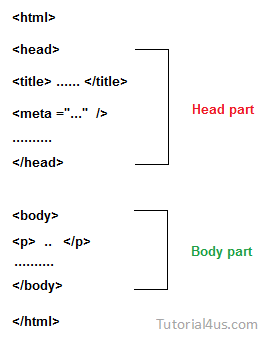
Structure of Html Program

Every Html program contain two parts they are;.
  • Head part
  • Body part
Structure of html programs

Head part

By using head part you can provide following information related to that web page.
  • Provide title of that page.
  • Description about that page.
  • What content inside that web page ?
  • Who develop that page, (author name) ?
  • Refresh that page after particular interval of time.
  • When page will be expire ?
  • Google Spider follow that page or not ?
  • Keyword for search that page by search engine.
Note: For adding all above things you need meta tag (<meta>) we will discuss later.

Body part

Body part contains the actual information which is display on web page.

Comments

Popular posts from this blog

Introduction of SQL

Introduction of SQL SQL (Structure Query Language)  was initially developed at IBM by Donald D. Chamberlin and Raymond F. Boyce in the early 1970s. This version, initially called SEQUEL (Structured English Query Language), was designed to manipulate and retrieve data stored in IBM's original quasi-relational database management system. Features of SQL SQL is not a case sensitive language. Every commands in SQL should ends with semicolon(;). SQL can also called as sequel (SEQUEL). SQL Sub Language SQL is mainly divided into four sub language Data Definition Language(DDL) Data Manipulation Language(DML) Transaction Control Language(TCL) Data Control Language(DCL) Only for remember You can remember all these command like below; DDL Commands "dr. cat" d-Drop, r-Rename, c-Create, a-Alter, t-Truncate. DML commands "sudi". s-Select, u-Update, d-Delete, i-Insert.

SQL Syntax

SQL Syntax SQL follows some unique set of rules and guidelines called  Syntax . Some basic guidelines related to SQL Syntax are given below; SQL is not case sensitive. Commonly SQL keywords are written in uppercase. You can write SQL statements in one line or in multiple lines. SQL are depends on relational algebra and tuple are relational calculus. SQL statement SQL statements are started with any of the SQL commands/keywords like SELECT, INSERT, UPDATE, DELETE, ALTER, DROP etc. and the statement ends with a semicolon (;). Syntax SELECT * FROM table_name; Why use semicolon after SQL statements ? Semicolon is used to separate SQL statements. It is a standard way to separate SQL statements in a database system in which more than one SQL statements are used in the same call. Some Basic Commands SELECT:  It is used for Retrive data from a database. UPDATE:  It is used for updates data in database. DELETE:  It is used for deletes data from da...

SQL Default Constraints

SQL Default Constraints Default Constraints  is used to insert a default value into a column. The default value will be added to all new records, if no other value is specified. My SQL or SQL Server or Oracle or MS Access create table Employee ( e_id number(3) NOT NULL,, e_name varchar(15), sal number(5), City varchar(255) DEFAULT 'Delhi', ); In above syntax in city column by default value for city of every employee is delhi. SQL DEFAULT Constraint on Alter Table My SQL ALTER TABLE Employee ALTER City SET DEFAULT 'delhi' SQL Server or MS Access ALTER TABLE Employee ALTER COLUMN City SET DEFAULT 'delhi' Oracle ALTER TABLE Employee ALTER City SET DEFAULT 'delhi' Drop Default Constraints My SQL ALTER TABLE Employee ALTER City DROP DEFAULT SQL Server or Oracle or MS Access ALTER TABLE Employee ALTER COLUMN City DROP DEFAULT