Normalization in BDMS
Normalization is a process or a technique which is used to reduced or decompose the redundancy(repetition) within the database. In common language you can say that normalization is used to remove repetition of data or record within database.
We have totly six types of normal forms.
- 1 st NF (1st normal form)
- 2 nd NF (2nd normal form)
- 3 rd NF (3rd normal form)
- BCNF (BOYCE CODD NF)
- 4 th NF
- 5 th NF
Dependency
It can be defined as same values in the table are depending on a specific column. There are three type of dependency.
- Full function dependency
- Partial function dependency
- Transitive function dependency
Full function dependency
In this all the non-key attributes fully or functionally depending on only one key attribute column. and the record in the table which is uniquely identify by using key attributed column.
Partial function dependency
In a variable we may have more than one attribute column and some of the column are depending one key attribute column and some other non-key attributes are depending on other key attribute so these table can not follow full function dependency. we can avoid this problem by using 2nd normal form.
Transitive function dependency
Here one non-key attribute function is depending on another non-key attribute table should not maintain transitive function dependency so avoid this by using 3rd normal form.
1st Normal form
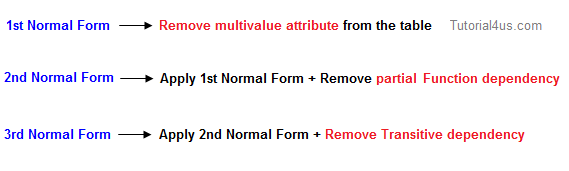
In this normal form user need to remove the multi-value attribute on the table.
EXAMPLE
 Example First normal form
2nd Normal form
In 2nd Normal form maintain the 1st Normal form and remove the partial function dependency.
EXAMPLE
The following functional dependencies exist:
1. The attribute ProfessorName is functionally dependent on attribute IDProf (IDProf --> ProfessorName)
2. The attribute StudentName is functionally dependent on IDSt (IDSt --> StudentName)
3. The attribute Grade is fully functional dependent on IDSt and IDProf (IDSt, IDProf --> Grade)
1. The attribute ProfessorName is functionally dependent on attribute IDProf (IDProf --> ProfessorName)
2. The attribute StudentName is functionally dependent on IDSt (IDSt --> StudentName)
3. The attribute Grade is fully functional dependent on IDSt and IDProf (IDSt, IDProf --> Grade)

3rd Normal form
In 3rd Normal form maintain the 1st and 2nd normal form and remove the transitive function dependency.
1. Name, Account_No, Bank_Code_No are functionally dependent on ID (ID --> Name, Account_No, Bank_Code_No)
2. Bank is functionally dependent on Bank_Code_No (Bank_Code_No --> Bank)
2. Bank is functionally dependent on Bank_Code_No (Bank_Code_No --> Bank)
 Example Third normal form
BCNF
Boyce and Codd Normal Form is a higher version of the Third Normal form. This form deals with certain type of anomaly that is not handled by 3NF. A 3NF table which does not have multiple overlapping candidate keys is said to be in BCNF.
Comments
Post a Comment